

Engenia Software
1.x Software Revision
When I joined Engenia Software as the User Interface Engineer, the core product was in sorry shape. It had been specified by a Sales Engineer, and had been designed by a marketing design group with no experience in designing software:
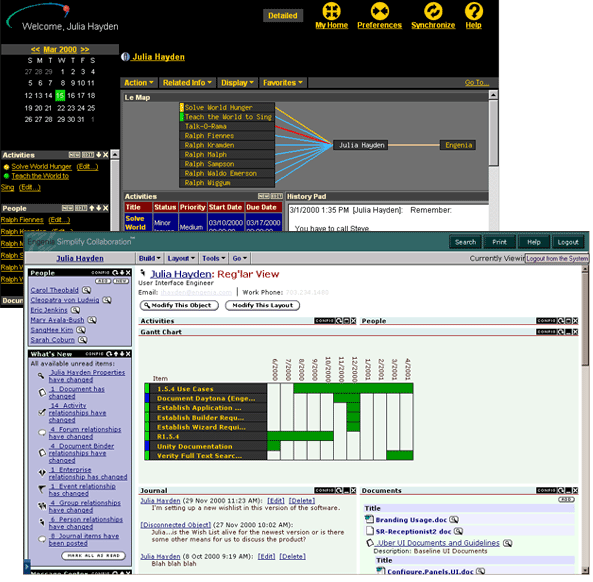
My first task was to transform the software into something inviting and usable. Within a month, I had transformed the user interface into something lighter, more inviting, and infinitely more usable. I had the developers simplify the UI implementation (notably reducing the number of frames used to make up the original implementation from 9 to 2), replaced stylesheets, buttons, terminology, and icons, and began creating a coherent visual standard.
The second screenshot was taken 9 months after I began working at Engenia. By this time we'd established a dozen look-and-feels (generated by clever use of style-sheet) that mixed color palettes and display styles to suit many different preferred atmospheres. I developed a series of icons (that soon made their ways onto the sides of coffee mugs) to help users quickly parse the context of the information they were looking at.
I transformed the functional flow and information architecture of the product, made the product's concept of a relationship web of business objects (e.g., people, documents, groups, tasks) more coherent and understandable, codified the use of color and shape as indicators, and worked on numerous variations of our core concepts.
The Icons
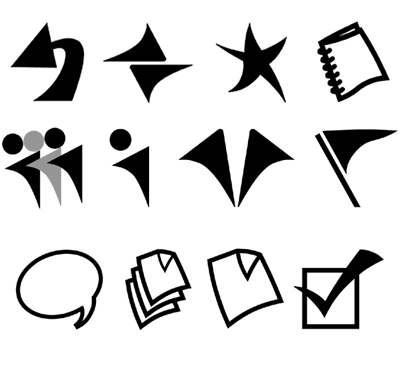
I designed these icons (top row: Previous, Organization, Favorites, Binder (of documents); middle row: Group, Person, Enterprise, Milestone; lower row: Discussion, Document, Documents, Task) to add a graceful note of informality and movement to the product without sacrificing the sobriety or professionalism a client would expect to see in the product. These icons were used in the web-based application as referential markers embedded next to an object's name and as screened-out backgrounds on relevant panels.
In an another component of the product - an Engenia version of a file browser - these icons were used as windows icons to help a user browse, access, and view Engenia Unity objects (notably documents and people) without firing up the browser-based tool.