

Engenia Software
Improved Search Functionality
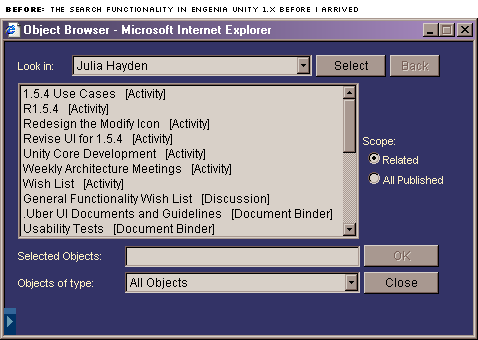
One of the most confusing elements of Engenia Unity was the Object Browser (depicted in dark blue, above). It allowed users to browse a relationship hierarchy of objects in the system (people, groups, activities and tasks, projects, events, enterprises), and select objects of interest for viewing, acting upon, or configuring. It was frequently used - and rarely understood.
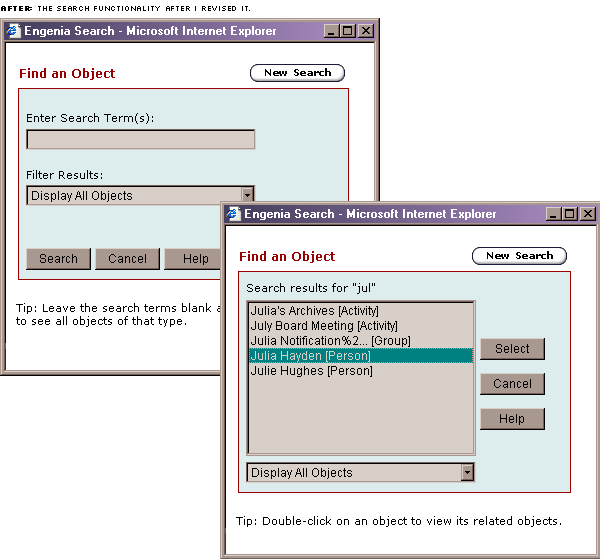
I redesigned the Object Browser into an Object Search (displayed at the top of the page in one of the new palettes I specified, Chunky/Aqua), a concept users were signficantly more familiar with. I minimized the complexity, downplayed the ability to browse the list and see the objects related to one object, and put it into a form that was far more familiar to the average user.
The top two windows display the redesigned Single Object Browser, now labelled Object Search. When appropriate (e.g. to configure, to build a team, to collect a series of documents), users would see an Object Search that allowed them to select multiple objects (see below). We implemented a simple keyword search, provided the ability to filter the list to show objects of a specific type, and allowed people to browse the list if they so chose. A significant portion of the userbase would regularly search for a document or task whose name they could not remember by searching for the person it was assigned to, and browsing their list of related objects for the item they were looking for.
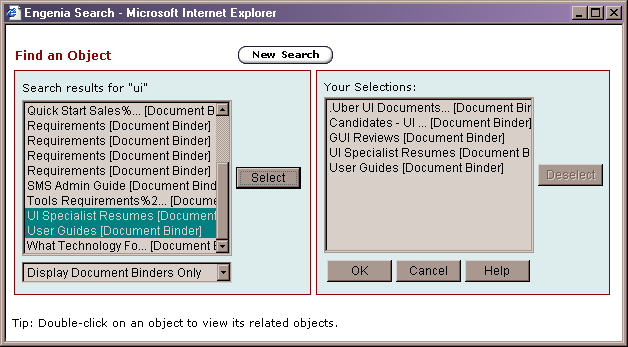
The old Object Browser was particularly painful for people who need to search for multiple items. In the revised (multiple) Object Search, those people now have a holding bin to hold their objects while they assemble the collection; users can add objects to that list from their search results. While previously the user-selected objects were "shown" to the user in a long, comma-deliminated string, users now see their objects in a list that they can edit at any time.
The Object Search function made a tremendous impact on the usability of our system; people were less frustrated, more effective, and felt better about the application itself.