

Engenia Software
Engenia Unity 4.X Role Based Console Elements
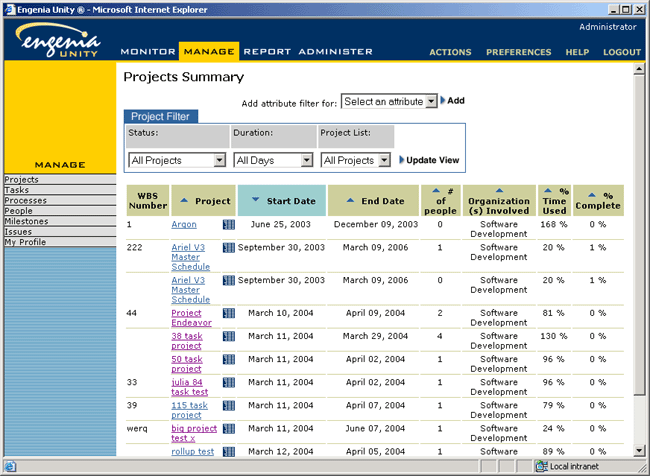
In 2002, we abandoned all work on our then-current web-based console/control panel and underlying technology and started all-over again. I delegated the work for the Role Based Console (RBC) to another designer, and gave him responsiblity for the overall design. When he was promoted to become our product manager in 2003, the RBC became my responsibility again. In that time, I've tightened the overall user interface, and changed some visual elements.In the screen below, I am responsible for the branding, the removal of several buttons in the top row, color-branding each section, the tab metaphor that has roll-overs in muted tones (in the families of the color-branding, and the striped background pattern behind the navigation panel.
The RBC allows users to monitor their projects or tasks on a constantly updating page, to manage and view those projects or tasks, to run specific reports, and to manage the installation. As with our client applications, this application was built by an outsourced team. Although we gave them HTML templates to use, they chose to reproduce the screens from scratch, approximating what they saw in our templates, often in the most oblique and non-intuitive ways possible. Due to near constant bug fixes on this screen, I have not yet been able to go in and fix the most egregious UI errors (the free-floating sort arrows, the lack of proximity from the Add Attribute Criteria drop down box to the filter, the table layout)
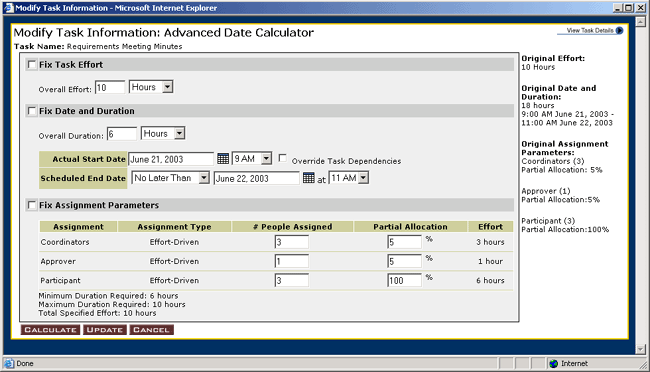
One of our newest features is this project hierarchy screen. Although the first version of this tool has been implemented and will be delivered to our customer, the visual elements of the user interface were implemented poorly by our outsourced development team. Because of our ambitious development schedule, I decided that it was more important that the feature work as specified than to look right.
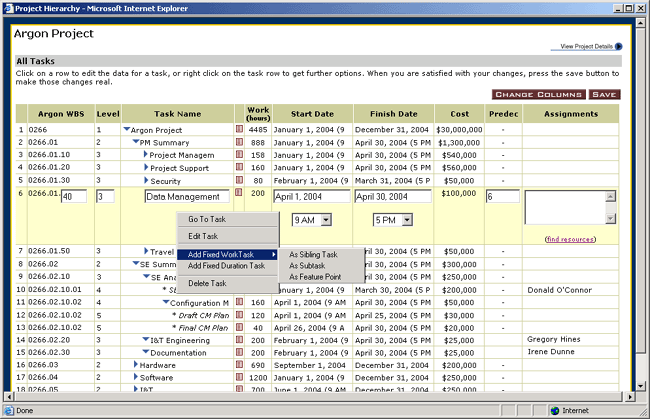
The Project Hierarchy is intended to provide the user with a hierarchical and editable view of the entire project (depending on his entitlements). The user can customize the columnset and order, and make dozens of changes at once. Of all of the new features in our system, this is the one our clients are the most excited about. Over the next year, we intend to transform this feature into a configurable screen element that can be set to list all of the projects or tasks assigned to a particular user, group, or organization, to define and manage metadata, and to help managers manage their team members.